
Ground Impact
See estimated ground-level hail in clear size bands. Start with stronger, persistent signals, then check nearby reports and conditions on site.
Hail maps and roofing canvassing software, together. HailMapr's Ground Impact layer estimates where hail likely reached the ground, helping you focus your inspection and canvassing plan.
Free to start. No credit card required. Explore the tools before choosing paid coverage.
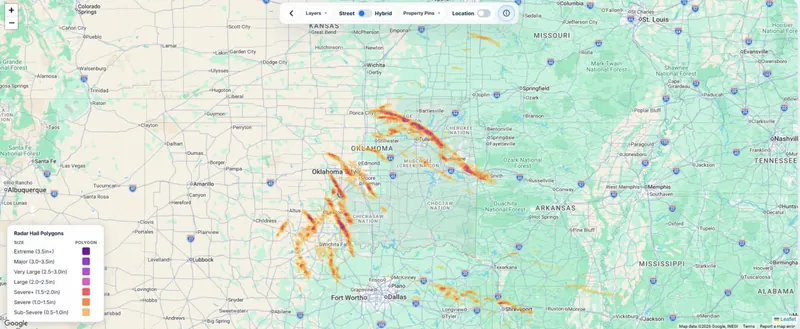
Ground Impact helps narrow a broad hail footprint into areas to prioritize—so your team can spend less time choosing where to go and more time inspecting.
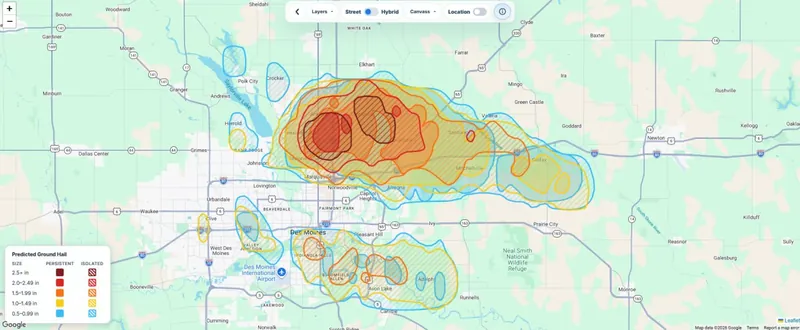
See estimated ground-level hail in clear size bands. Start with stronger, persistent signals, then check nearby reports and conditions on site.
HailMapr Live refreshes as new data is processed, including Ground Impact when available. Review the map's update time; active maps evolve as the storm unfolds.
Turn a target area into saved doors, assigned reps, inspection appointments, and follow-up. Keep the work connected to the storm.
Ground Impact estimates hail exposure, not confirmed roof damage. Use it to prioritize inspections—not to promise a damaged roof or an approved claim.
Review recent storms and live activity where your roofing team works.
Compare estimated sizes, persistent signals, and nearby hail reports.
Learn to save doors and document what your team actually finds on site.
Assign the next action and track each opportunity through your pipeline.
Learn the tools before you commit.
Buy a storm or choose a coverage plan.
Keep everyone working from the same plan.
Free accounts can browse storm listings. Paid storm access requires a map purchase or an eligible plan.
Practical guides for reviewing a storm and keeping your fieldwork organized.
Choose a two-hour window and see how the storm moved, with Central Time timestamps and adjustable opacity.
Review available weather records at a door pin and follow the lookup or PDF job in Your Report Activity.
Understand the difference between radar estimates, observed hail reports and findings from a property inspection.
Try a real storm map, or walk through Ground Impact and Canvass with Derrick. Bring your market and your questions.
Yes. Create a free account to explore HailMapr, browse storm resources, view public weather tools, follow hail reports, and start using the platform right away.
HailMapr is built for roofing teams, restoration contractors, adjusters, property teams, storm chasers, and homeowners who need clearer hail intelligence.
HailMapr combines hail swaths, Ground Impact, live hail monitoring, population and housing estimates, property-level hail probability, outlooks, reports, storm replay, and the HailMapr Canvass pipeline in one website.